# Introduction
> This the second revision of the Complete Intro to Databases. You do not need to have taken v1 - this is just an updated version of it!
Welcome! Hello! This is the Complete Intro to Databases v2. I'm so excited to share with you some of my knowledge that I've earned working in the field. Knowing how to properly use a database will give you a leg up in your career, both from the perspective of being able to achieve more in your apps and from the perspective of being able to interview well for jobs that need to use databases. And if I'm being honest, I think learning how to and using these databases is a lot of fun. It's a fantastic feeling to throw some data into one of these databases and then be able to retrieve data and insight using various querying techniques and abilities.
## Who is this course for?
This course is for anyone who wants to understand the various sorts of databases that are available to them, how to use a few of them, and when to choose which one.
In order to get the most out of this course, you should be comfortable with a command line prompt and a little bit of programming. If you are not familiar with a command line prompt, [I taught a course on it here][command-line] that if you take that will more than get you ready for this course. If you are not familiar with programming, [I have course on that too][web-dev].
All the programming samples will be in JavaScript with Node.js but if you code in something else like Python or Ruby these code samples should look familiar enough that you should be fine. The code won't be the focus of the samples, the database interactions will be.
## Who am I?

My name is Brian Holt and I am an engineer and product manager. I have been writing code most of my life thanks to my dad and brother and I have been a professional developer for a decade. Actually, funnily enough, my father used to work one of the OG large-scale databases, IBM DB2. It is a bit of a full circle for me to be coming in and teaching a course on databases considering that. Of course we're going to be focusing on open source databases!
I'm excited to share with you my experience using databases that I've garnered over my career at companies like Reddit, Netflix, LinkedIn, Microsoft, Stripe, Snowflake, Neon, and Databricks. I had to write a lot of SQL early in my career (from MySQL primarily) and it has only helped me throughout my career. I was also an early user of MongoDB and attended one of the first MongoDB Days in San Francisco. Believe it or not that was actually my first tech conference (I've since been to 100+ events.)

When I'm not working or creating content I try to get away from my keyboard. I enjoy snowboarding, exercising, local beer, coffee, traveling around the world, playing with my adorable Havanese dog Luna, hanging out with my amazing wife and two kids, and getting my ass kicked at Overwatch. I'm passionate about people and helping them fulfill their own potentials, having amazing local experiences where ever I am, and having a drink with those I love.

## Special Thanks to Frontend Masters

I want to thank Marc and the whole Frontend Masters team explicitly. In addition to being family to me these are some of the most wonderful people I've ever met. You are reading or watching this course thanks to their hard work to make the world of tech more approachable with high quality instructors teaching what they know best. I want to thank them for creating the platform, garnering a community of knowledge-seeking developers, and giving me incentive and a platform to speak to you all. One specific kindness is that while the videos are on the platform (and I think they are worth every penny to watch) they let me release this website and materials as open source so every person can acquire the knowledge.
Thanks Frontend Masters. Y'all are the best.
## PS
Please catch up with me on social media! Do note I'm not the best at responding to private messages, especially Twitter DMs and LinkedIn messages!
- [Twitter][tw]
- [LinkedIn][li]
- [GitHub][gh]
- [Bluesky][bs]
[command-line]: https://frontendmasters.com/courses/linux-command-line/
[web-dev]: https://frontendmasters.com/courses/web-development-v2/
[tw]: https://twitter.com/holtbt
[gh]: https://github.com/btholt
[li]: https://linkedin.com/in/btholt
[bs]: https://bsky.app/profile/brianholt.me
[course]: https://github.com/btholt/complete-intro-to-linux-and-the-cli
=================
# Installation Notes
In this course we will be using four different databases: MongoDB, PostgreSQL, Neo4j, and Redis. These are software packages that you will have to download and get running and you have several options to do that. All of these will work on macOS, Windows, and Linux. I'll be sure to cover in depth how to do it on macOS and Windows and I assume all my Linux friends can adapt the macOS instructions to themselves.
In every case, if you have issues that I'm not having, you may need to make sure you are getting the same version I am using. If you don't you will may run into problems as the syntax and queries can change from version to version. Here are the version I'm using for this course.
- MongoDB v8.2.5
- PostgreSQL v18.1
- Neo4j 2026.01.4-community-trixie
- Redis v8.6.0
- DuckDB v1.5.0
I made sure that all my installation options should get you a similar minor version to me.
Here are a few of your options:
## Docker
This is going to be how I'm going to do it (except for DuckDB) and I will show you the correct Docker commands to run it this way. If you are unfamiliar with Docker and containers, [I have a course here][containers] that will quickly get you up to speed on this. Even if containers aren't super familiar to you, if you install Docker and follow the commands everything should just work. [Head here][docker] to install Docker Desktop which will handle everything you need.
## Package manager
Another perfectly good option is to install the databases from a package manager. If you're on macOS, that will be [homebrew][brew] on macOS and if you're on Windows that will can be either [winget][winget] (this is still in public preview so it may not work totally well yet) or [Chocolatey][choc]. As of writing, winget only has MongoDB and PostgreSQL. Homebrew and Chocolatey have all of the requisite databases.
For Linux, you will be using whatever your distro's package manager is. If you're using Linux as your desktop I assume you know how to do that.
## Download and install the binary yourself.
You can just head to all of the websites and install them yourself! I prefer to do this through a package manager but there's no reason you can't do it this way if you prefer. Here are all the correct URLs for you. Make sure you downloading the version I'm listing or you may have issues (it likely won't be the current version.)
- [MongoDB][mongodb] – v8.2.5
- [PostgreSQL][postgresql] - v18.1
- [Neo4j][neo4j] - 2026.01.4-community-trixie
- [Redis][redis] - v8.6.0
- [DuckDB][duckdb] - v1.5.0
## Cloud solutions
I'm going to throw this out as a possibility if your computer simply cannot run a database. Chromebooks and iPads could potentially have this problem. All of these databases do run in the cloud and you could probably get a free trial version of each of these running in the cloud and just connect remotely to these databases. This could be difficult because it'll be a lot of managing connection strings and firewall rules and the like. I'll let you look for these on your own since I have a bit of a conflict of interest here in which one you choose (as of present I work for Microsoft's cloud, Azure.)
## Node.js Version
We will be running some code samples with Node.js. It's less important which version of Node.js you choose as long you're above version 10. I will be using the latest LTS for this course, v24.13.1. Feel free to install through [the website][node] or through some sort of version manager like [nvm][nvm].
## LLM
If you are able to, it's great to use an LLM like ChatGPT, Claude, or Gemini with this course. I have made all of these course note available as one giant text doc that you can load directly into your LLM so you can ask it about the course.
[Here is the link to the text file][llms].
[containers]: https://frontendmasters.com/courses/complete-intro-containers-v2/
[docker]: https://www.docker.com/products/docker-desktop
[winget]: https://docs.microsoft.com/en-us/windows/package-manager/winget/#install-winget
[choc]: https://chocolatey.org/
[brew]: https://brew.sh/
[mongodb]: https://www.mongodb.com/try/download/community
[postgresql]: https://www.postgresql.org/download/
[neo4j]: https://neo4j.com/download-center/#community
[redis]: https://redis.io/download
[duckdb]: https://duckdb.org/install/?platform=macos&environment=cli
[nvm]: https://github.com/nvm-sh/nvm
[node]: https://nodejs.org/en/download
[llms]: /llms.txt
=================
# Terminology
Before we hop in to working with these various sorts of database I want to make sure we are clear on some common terminology and what the goals are for today, what we are going to cover and what we are not.
## What is a database and other common terms
A database is a place to store data. Another way to think about this is that it is a place to save your application's state so that it can be retrieved later. This allows you to make your servers stateless since your database will be storing all the information. A lot of things can be thought of as a type of database, like an Excel spreadsheet or even just a text file with data in it.
A query is a command you send to a database to get it to do something, whether that's to get information out of the database or to add/update/delete something in the database. It can also aggregate information from a database into some sort of overview.
## Schema
If a database is a table in Microsoft Excel, then a schema is the columns. It's a rigid structure used to model data.
If I had a JSON object of user that looked like `{ "name": "Brian", "city": "Seattle", "state": "WA" }` then the schema would be name, city, and state. It's the shape of the data. Some databases like PostgreSQL have strict schemas where you have to know the shape of your data upfront. Others like MongoDB let you invent it on the fly.
## What are the types of databases
There are many types of database available today. We're only going to cover four types but it's good to know what else is other there. Today we're covering relational databases (often called RDBMS or SQL databases,) document-based databases (often called NoSQL,) a graph database, and a key-value store. Here's a few we are _not_ covering.
- **Search engines** like Solr or Sphinx are often paired with databases to make search possible. If your database doesn't support full-text search this is a tool you could pair with a database to make a site-wide search engine possible.
- **Wide Column Databases** uses the concepts of tables, rows, and columns like a relational database but has a dynamic nature to those formats of rows and names. As such it can sorta be interepted like a two dimensional key-value store. Apache Cassandra and Google Bigtable are two famous examples of this. These databases are famous for being able to be massive scale and very resilient.
- **Message brokers** are a vastly underutilized piece of architecture by Node.js developers that can really improve your flexibility and scalability without greatly increasing complexity. They allow apps and services to publish events/messages on a system and allow the message broker to publish/inform subscribers to those events that something happened. It's a powerful paradigm. Apache Kafka, RabbitMQ, and Celery are all related to this paradigm.
- **Multi model databases** are databases that can actually operate in multiple different ways, fulfilling more than one of these paradigms. Azure Cosmos DB, SurrealDB, and ArangoDB are two primary examples of this. MongoDB and PostgreSQL technically are these as well since they have features that allow you to bend them into different shapes.
## ACID
You'll see this term thrown around a lot. Old school database professionals sometimes will treat this as gospel: all databases must adhere to ACID. I more want to show you that it's a tradeoff that you'll be making.
This stands for atomicity, consistency, isolation, durability. It's an acronym that's frequently used when talking about databases as it's four of the key factors one should think about when thinking about writing queries.
- Does this query happen all at once? Or is it broken up into multiple actions? Sometimes this is a very important question. If you're doing financial transactions this can be paramount. Imagine if you have two queries: one to subtract money from one person's account and one to add that amount to another person's account for a bank transfer. What if the power went out in between the two queries? Money would be lost. This is an unacceptable trade-off in this case. You would need this to be _atomic_. That is, this transaction cannot be divided, even if you're sending multiple statements. It all happens, or none of it happens, but it never half-happens.
- If I have five servers running with one running as the primary server (this was sometimes called master but we prefer the terms leader or primary) and the primary server crashes, what happens? Again, using money, what if a query had been written to the primary but not yet to the secondaries? This could be a disaster and people could lose money. In this case, we need our servers to be _consistent_.
- _Isolation_ says that we can have a multi-threaded database but it needs to work the same if a query was ran in parallel or if it was ran sequentially. Otherwise it fails the isolation test.
- _Durability_ says that if a server crashes that we can restore it to the state that it was in previously. Some databases only run in memory so if a server crashes, that data is gone. However this is slow; waiting for a DB to write to disk before finishing a query adds a lot of time.
Not everything you do needs to be ACID compliant. ACID is safe but slow. You need to make the right trade-offs for every app and query you're making. Many of these databases allow you to be flexible per-query what level of ACID you need your query is. Some queries you want to make sure get written out to the secondary before moving on. Others it's fine with a small amount of risk that it could be lost. Some queries need to be atomic, others partial failures aren't the end of the world. It's about balancing what the needs of your apps are versus cost and speed.
## Transactions
Along with atomicity is the idea of transaction. Some queries just need multiple things to happen at once. The way this happens is transcations. A transaction is like an envelope of transactions that get to happen all at the same time with a guarantee that they will all get ran at once or none at all. If they are run, it guarantees that no other query will happen between them. Like the bank transfer example, these can be critical in some places because a partial failure is a disaster, it either needs to all happen or not happen at all.
=================
# Intro to SQL Database
First things first: when I say SQL databases I mean relational databases (also frequently abbreviated as RDBMS, relational database management system.) It's important to note that not all relational databases use SQL and not all non-relational databases don't use SQL (i.e. some NoSQL databases do use SQL.) However I'm using the most common terminology here to help you integrate with the information already out on the Internet. This is a case (like serverless) where marketing won and we ended up with weird terminology.
## What is a relational database
The best way I can think of to describe a relational database is to think of a spreadsheet like Excel, Numbers, or Sheets. It's a big table with many columns and rows. Each row reprents one entry in the database and each column represents one field (or type of data) in the database.
Most relational databases have structured schema to them; you can't just make stuff up on the fly like MongoDB or other NoSQL databases. You have to follow a pre-made schema when you insert into the database. For example, when you create your address database, it will have address, city, and state on it. If someone tries to insert a "comment" column into it, it won't let them because it's outside of your pre-defined schema. This can be a benefit because it enforces some discipline in your app but it also can be inflexible.
The secret power of relational databases is in their name: you can have multiple databases and/or tables that all relate to each other. I guess if it's in the name it's not that secret. Whereas in MongoDB it's a bad idea to try and JOIN together documents across collections, it's a great idea for multiple tables in a relational databases to JOIN together.
## What is SQL
SQL stands for structured query language. It's basically a way of forming questions and statements to send to a database to create, read, update, and delete records. Each relational database has its own flavor of how it wants that SQL to look but in general they're mostly withing spitting distance of each other. Whereas with MongoDB we were sending JSON query objects, here we'll send query strings that the database will read and execute for us. It's a very powerful and flexible language but this is a deep ocean. [Technically SQL is Turing Complete][turing]. I remember my very first job, an internship actually, I was spending all day crafting enormous (dozens of lines) queries. We're not going that deep. We'll cover the basics here and then you can go deeper when you need to.
The key here is that you understand how a relational databases work, can break data architectures down into relations, and know how to write proper queries to a relational databases.
## The SQL Landscape
Today we're going to be talking about PostgreSQL and I want to justify that decision to you. There were a lot to choose from here (whereas MongoDB was really the obvious choice in the NoSQL space.) Before I extol the virtues of PostgreSQL to you, let's explore what we could have chosen.
## MySQL / MariaDB
The other "obvious" choice would have been MySQL and honestly it's the one I've used the most personally besides Postgres in my career. It also backs the wildly popular WordPress and is just really popular in general with companies like Facebook, Google, and Netflix being known for being big users of them. It is absolutely a valid choice to use them today; it's highly scalable, a very well understood and mature codebase, and has plenty features to keep you happy. It is owned by Oracle which does offer some users pause (they acquired it via their Sun acquisition.)
Some of the original creators of MySQL forked it after the Oracle acquisition to make MariaDB which is mostly a drop-in replacement for MySQL. It's also a very good choice and widely used today.
## SQLite
Another very, very common database. SQLite is a stripped down, very small, and very performant database. It's actually meant to ship with whatever server it's running with; it's not meant to be its own server. Instead of having a complicated way of storing information, it literally just writes it to a file! Gutting all the necessary network code and replication code makes it a tiny database easy to ship with IoT devices, on operating systems, game consoles (both PlayStation and Xbox use it!), fridges, and literally everywhere around you.
Companies like Turso and Cloudflare are turning SQLite into a cloud deployed database, and it's valid now for using with web apps, particularly in highly distributed situations or cases where you where you a million tiny databases versus one large monolith.
I teach a class on [SQLite][sqlite] here.
## Microsoft SQL Server / Oracle / DB2
All of these are commercial products. They're all fairly old products (my father actually worked on DB2 at IBM!) that work well at huge scales but their price tags can be very hefty. And since I've never used them nor would I because of the great open source databases available, I'll leave you to explore them on your times.
## PostgreSQL
This takes us to PostgreSQL (said "post-gress"). PostgreSQL is another wonderful open source database that continues to gain lots of marketshare and how some absolutely killer features to it. We'll get into those as we go but know it scales, it is reach with great features, and is a very popular. It has illustrious users such as Apple, Microsoft, Etsy, and many others.
In fact I'll go as far as to say that Postgres has "won". It's the workhouse, do-all database. Postgres should be your default decision, and you should only pivot when you have a reason to.
I'm going to show you that Postgres (via features and extensions) can actually do most of what these other databases can do pretty well. So if you have light NoSQL or graph needs, Postgres can actually do that pretty well. If your app relies totally on having graphs and edges, then yes, something like Neo4J will be important. It's all trade-offs, and my bias is err strongly on the side of simplicity / have fewer tools. So that's my bias, and I wanted to disclose that up front!
[turing]: https://stackoverflow.com/a/7580013
[sqlite]: https://sqlite.holt.courses/
=================
# PostgreSQL
So we examined a bit of the general relational databases in the previous section, let's get into some interacting with some databases.
## Let's get PostgreSQL going
Let's start by getting a PostgreSQL container going. I'm going to use version 13.0 (the latest container available) and I'd recommend for this tutorial you do the same. While newer ones might be available, this is the one that will work with this tutorial.
```bash
docker run --name my-postgres -e POSTGRES_PASSWORD=mysecretpassword -p 5432:5432 -d --rm pgvector/pgvector:pg18-trixie
docker exec -it -u postgres my-postgres psql
```
- We have to give it a password or PostgreSQL won't start by default. Don't worry, this isn't how'd you start it in production.
- We're running as the `postgres` user.
- We could use the normal Postgres image, but we're gonig to use the pgvector image. This is the same image as Postgres but it adds the pgvector extension in as well so we don't have to install it later. Otherwise it's the same.
## Databases and Tables
This can be confusing as the term "database" gets overloaded. When I hear "database", I think macro level constructs like Postgres and MySQL, which is true, but these products also use the term "database" to represent essentially one instance of the internal data structures. So with Postgres, you can have multiple databases. It's essentially a group of tables. So you could organize your data into the "analytics" database and into the "operational" database if you wanted strong separation between the two.
Think of it like a spreadsheet. A "database" in this sense would be a whole new spreadsheet, saved separately. You'd have to open a whole new file to have access to the data. It's difficult to correlate cells across two whole files (but not impossible, just generally not what you'd want to do.)
This will be a group of tables that are related to similar problem-area. It'll be up to you how you choose to group these. Some apps are focused enough to all be in one database; others will need many databases. It's up to you and your data architect to figure out how to do that. In general, things that should be scaled separately (like maybe payment transactions and items in your store?)
Tables are similar to a table in a spreadsheet. This will be a group of columns and rows. It's like one Excel spreadsheet tab. A record (or row) is one thing in a table. One record would be a user in the users database.
Tables will have a defined schema. Like in Excel, one column will reprent one bit of information, so too will a field in a record represent one bit of information. This schema has to be defined in advance and cannot be done on the fly. Altering a table's schema is a hefty operation and on big tables can literally takes hours or days to do. Forethought is a important here.
This is a simple intro to this. There's a lot more to this but we'll get into as we go through our defined example.
## Our first SQL queries
The first order of business it create a new database. And we're going to do that using SQL. All SQL is fairly similar but are not necessarily drop-in compatible with each other. So while this would be similar in getting started to MySQL, it wouldn't be identical.
First thing you'll notice is I'll capitlize all the key words. This is to make reading the query easier, you can see what's a key word and what's not at a glance. And moreover it's just common to do so I stick with common best practices. And I forget to do it a lot too 😅
By default you connect to database "postgres" which is just a default database name. Let's make our own called `message_board`.
So go ahead and run your first query here to create a new database. **Make sure you include the `;` at the end.** While the semi-colon is optional in JS it is not in SQL! It thinks you're still going until you include that `;`.
```sql
CREATE DATABASE message_boards;
```
You should see `CREATE DATABASE` underneath that as a confirmation that it went through. Great! Now we have a new database to switch to, so let's do that.
```sql
\c message_boards;
-- \connect message_boards works too
```
This `\` notation is how you give admin commands to PostgreSQL through its `psql` CLI which is what we're using right now. In this case we're saying connect to this new database. Let's try a few other commands real quick!
```sql
-- see all databases
\l
-- see all tables in this database, probably won't see anything
\d
-- see all available commands
\?
-- see available queries
\h
-- run a shell command
\! ls && echo "hi from shell!"
```
In case you didn't know, `--` is how you do comments in SQL.
## First table
Okay, so now we have a database and we're connected to it, let's create our first table.
```sql
CREATE TABLE users (
user_id INTEGER PRIMARY KEY GENERATED ALWAYS AS IDENTITY,
username VARCHAR ( 25 ) UNIQUE NOT NULL,
email VARCHAR ( 50 ) UNIQUE NOT NULL,
full_name VARCHAR ( 100 ) NOT NULL,
last_login TIMESTAMP,
created_on TIMESTAMP NOT NULL DEFAULT CURRENT_TIMESTAMP
);
```
So let's break this down
- CREATE TABLE is the command we'll use to create a new table. We're naming it the users table
- `user_id` will be an incrementing field The first users will have a user_if of 1, the second one will have user_id of 2, etc. That's what the `GENERATED ALWAYS AS IDENTITY` means. It's autoincrementing. The PRIMARY KEY part means it's what the table will be indexed on which means inherently that it is indexed.
- Previously PostgreSQL used a field type called `SERIAL` to describe the serially incrementing IDs. The `GENERATED AS ALWAYS` syntax is newer, more compliant to the generic SQL spec, and works better. Always use it over `SERIAL`.
- PostgreSQL does not create a primary key for you - if you want one you need to do it yourself (other databases like MongoDB do it for you automatically.)
- We created two VARCHARS which is the SQL way of saying string. The username will have a character limit of 25 and the email will have a charcter limit of 50. Each of them will be guaranteed unique (thanks to UNIQUE) and to not be omitted (thanks to NOT NULL).
- They could still be empty strings with NOT NULL but you'd have to intentionally specify that.
- full_name is not unique so you could have two Sally Rogers.
- We our last_login field it will be the last time the user logged in. We could use this later to clean out inactive accounts. Notice this doesn't have NOT NULL so when we create a new user they can have a null login time because they haven't logged in yet.
- We added a created_on, and if the query doesn't define it, it will just default what time it is now. Convenient, but also lets you define it to be a different time (maybe if you importing a list of users from another database.)
- We used `CURRENT_TIMESTAMP`, but we could have used `NOW()` too - CURRENT_TIMESTAMP is the SQL standard way of doing it, `NOW()` is the Postgres function. In practice they do precisely the same thing.
- Lastly we'll provide it with a date via the created_on field so we can keep track of when a user was created.
We won't be going into too many more PostgreSQL data types but there are a lot. [See here][types].
## First record
Let's insert a user into our new table. This is like adding a new row into a spreadsheet.
```sql
INSERT INTO users (username, email, full_name) VALUES ('btholt', 'lol@example.com', 'Brian Holt');
```
- This is how you insert a new record into a relational database.
- The `INSERT INTO` tells the SQL engine you're going to be doing an insert, and we're doing it into `users`.
- The `()` is where you provide the order you're going to be giving the fields to PostgreSQL in the VALUES part.
- Notice we're not providing user_id since PostgreSQL will provide that itself.
- We're also not providing a `last_login` time because it's not required and in theory the user hasn't logged in yet.
You should see `INSERT 0 1` to let you know that the query succeeded. The 1 represents that 1 record was inserted successfully and the 0 represents the OID which we're not covering nor using and will be 0 for us throughout our course i.e. no need to worry about it.
## See your first record
We're about to get into more advance querying but I want you to see the fruits of your labor! Run this query to fetch every record and every field from a table
```sql
SELECT * FROM users;
```
You should see your one row you've inserted! Good job! You're off to a great start. We'll go over the query we just ran in the next section.
[types]: https://www.postgresql.org/docs/9.5/datatype.html#DATATYPE-TABLE
=================
# Querying Postgresql
You'll find there's a lot of depth to SQL. There are people who most of their jobs is just writing SQL. But let's hop into the basics here. First thing I want to do is insert some dummy data into our users database.
[Click here][sql] for a sample set of tables for your database. What this query will do is drop all your existing tables and then re-set them up. At any time you can re-run this to get a fresh copy of your tables. You can literally just copy this whole thing and paste it into your command line connection to PostgreSQL (psql) and it'll work. There's a more elegant way to load it from the command line but we're in Docker and it's annoying so I'd just copy/paste it. It'll probably take 90 seconds to run.
## SELECT
Let's start with SELECT. This is how you find things in a SQL database. Let's run again the SELECT statement from our previous section and talk about it.
```sql
SELECT * FROM users;
```
This will get every field (which is what the `*` means, a.k.a. the wildcard) from the users database. This will be 1000 users.
## LIMIT
Let's select fewer users;
```sql
SELECT * FROM users LIMIT 10;
```
This will scope down to how many records you get to just 10.
## Projection
Let's just some of the columns now, not all of them (remember projections?)
```sql
SELECT username, user_id FROM users LIMIT 15;
```
In general it's a good idea to only select the columns you need. Some of these databases can have 50+ columns. Okay we've seen basic reads.
## WHERE
Let's find specific records
```sql
SELECT username, email, user_id FROM users WHERE user_id=150;
SELECT username, email, user_id FROM users WHERE last_login IS NULL LIMIT 10;
```
The first one will give us one user whose user_id is 150. The second one will give us 10 users that have never logged.
## AND plus date math
What if we wanted to see if they hadn't logged in and were created more than six months ago?
```sql
SELECT username, email, user_id, created_on FROM users WHERE last_login IS NULL AND created_on < NOW() - interval '6 months' LIMIT 10;
```
- This shows off the AND keyword where you can query multiple conditions.
- This shows off a bit of date math too. To be honest every time I have to do date math I have to look it up but here's the scoop for this one. created_on is a timestamp and we're comparing to `NOW()` (the current time of the server) minus the time period of six months. This will give us all users who haven't ever logged in and have had accounts for six months.
## ORDER BY
What if wanted to find the oldest accounts? Let's use a sort.
```sql
SELECT user_id, email, created_on FROM users ORDER BY created_on LIMIT 10;
```
For the newest account, just add `DESC` (you can put `ASC` above, it's just implied)
```sql
SELECT user_id, email, created_on FROM users ORDER BY created_on DESC LIMIT 10;
```
## COUNT(\*)
Wondering how many records we have in our database?
```sql
SELECT COUNT(*) FROM users;
```
This will tell you how many users we have in the database total. The `*` represents that we're just looking total rows. If we wanted to look at how many users have ever logged in (since COUNT will ignore NULL values)
```sql
SELECT COUNT(last_login) FROM users;
```
## UPDATE, RETURNING
Let's say user_id 1 logged in. We'd need to go into their record and update their last_login. Here's how we'd do that.
```sql
UPDATE users SET last_login = NOW() WHERE user_id = 1 RETURNING *;
```
Tools we already know! Let's say user_id 2 choose to update their full_name and email
```sql
UPDATE users SET full_name= 'Brian Holt', email = 'lol@example.com' WHERE user_id = 2 RETURNING *;
```
- You just comma separate to do multiple sets.
- Make sure you use single quotes. Double quotes cause errors.
- RETURNING \* is optional. This is basically saying "do the update and return to me the records after they've been updated.
## DELETE
This works as you would expect based on what we've done before
```sql
DELETE FROM users WHERE user_id = 1000;
```
[sql]: https://databases-v2.holt.courses/sample-postgresql.sql
=================
# Complex SQL Queries
Let's get into some more complicated querying. First thing we're going to need is two more tables, comments and boards. We'll be making the data structure for a very simple message board system that has users, comments, and boards. The interesting part here is that every comment is posted by a user and therefore will need to reference the user table, and it will be posted to board and therefore will need to reference a board from the boards table. This is what you would call relational data and where relational databases really shine.
## Foreign Keys
Let's jot down all of our schemas for our users, boards, and comments.
> You don't need to run these if you ran the previous sample SQL statement. This is just for you to look at the schema.
```sql
CREATE TABLE users (
user_id INTEGER PRIMARY KEY GENERATED ALWAYS AS IDENTITY,
username VARCHAR ( 25 ) UNIQUE NOT NULL,
email VARCHAR ( 50 ) UNIQUE NOT NULL,
full_name VARCHAR ( 100 ) NOT NULL,
last_login TIMESTAMP,
created_on TIMESTAMP NOT NULL DEFAULT CURRENT_TIMESTAMP
);
CREATE TABLE boards (
board_id INTEGER PRIMARY KEY GENERATED ALWAYS AS IDENTITY,
board_name VARCHAR ( 50 ) UNIQUE NOT NULL,
board_description TEXT NOT NULL
);
CREATE TABLE comments (
comment_id INTEGER PRIMARY KEY GENERATED ALWAYS AS IDENTITY,
user_id INT REFERENCES users(user_id) ON DELETE CASCADE,
board_id INT REFERENCES boards(board_id) ON DELETE CASCADE,
comment TEXT NOT NULL,
time TIMESTAMP
);
```
- The first two should look pretty familiar. The only new-ish thing is the user of the `TEXT` data type. This is basically a VARCHAR with no cap on length (or rather a very large cap.) It has some other small differences but for now just know it's uncapped text.
- `user_id INT REFERENCES users(user_id)` is technically all you need to make a foreign key. The first part, `INT`, makes it known that this key will be stored as an integer. It then uses the `REFERENCES` key word to let PostgreSQL know that it is a foreign key. A foreign key is a field in one table that references the **primary** key of another table. In this case, a comment will reference the user_id in another table, the users table. The `users` part say it's reference the users table and the `(user_id)` is the name of the key in the other table. In this case, we called both user_id (which will probably happen somewhat frequently but not always) so they match but if we had called the user_id just id in the users table, we'd put `id` there.
- `ON DELETE CASCADE` lets PostgreSQL know what to do if the user gets deleted. So if a user makes a comment on the message board and then deletes their account, what do you want it to do? If you omit the `ON DELETE CASCADE` part, it's the same as doing `ON DELETE NO ACTION` which means it'll just error and not let you delete the user until you've deleted all the comments first. You can also do `ON DELETE SET NULL` which means it'll make the user_id null on any comment that was made by that user.
- We've done the same for board_id, just referencing the boards table instead of the users table.
Let's go ahead and put some dummy data in there. Copy / paste [this query][sql] into your psql terminal if you haven't already (same sample SQL from before). It may take a few minutes.
## JOIN
So we want to build the view of message board where a user can see previews of individual posts. How could we write that query?
```sql
SELECT comment_id, user_id, LEFT(comment, 20) AS preview FROM comments WHERE board_id = 39;
```
- Two new things here. The `LEFT` function will return the first X characters of a string (as you can guess, RIGHT returns the last X charcters). We'r doing this because this hard to read otherwise in the command line.
- The `AS` keyword lets you rename how the string is projected. If we don't use AS here, the string will be returned under they key `left` which doesn't make sense.
Okay so you'll get something back like this:
```
comment_id | user_id | preview
------------+---------+----------------------
63 | 858 | Maecenas tristique,
358 | 876 | Mauris enim leo, rho
429 | 789 | Maecenas ut massa qu
463 | 925 | Phasellus sit amet e
485 | 112 | Maecenas tristique,
540 | 588 | Nullam porttitor lac
545 | 587 | Praesent id massa id
972 | 998 | Aenean lectus. Pelle
(8 rows)
```
We can't really use this to display the comments on our web app because your users don't care what user_id posted these comments, they want the username. But that doesn't live in the comments table, that exists in the users table. So how do we connect those together?
```sql
SELECT
comment_id, comments.user_id, users.username, time, LEFT(comment, 20) AS preview
FROM
comments
INNER JOIN
users
ON
comments.user_id = users.user_id
WHERE
board_id = 39;
```
Magic! The big key here is the `INNER JOIN` which allows us to match up all the keys from one table to another. We do that in `ON` clause where we say user_ids match is where you can join together those records into one record.
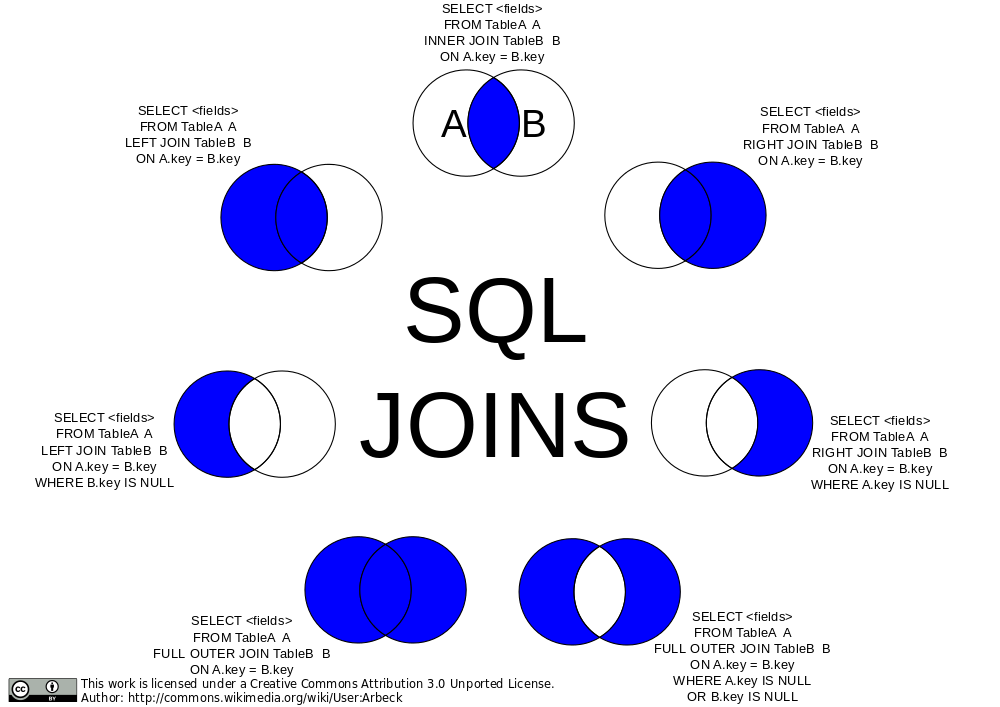
Let's talk about `INNER` for a second. There are multiple kinds of JOINs. INNER is a good one start with. It says "find where user_ids match. If you find a record where the user_id exists in one but not in the other, omit it in the results." This isn't a particularly useful distinction for us right now becase all user_ids will exist in users and we're assured of that due to the foreign key restraints we used. However if a comment had a user_id that didn't exist, it would omit that comment in the results.
[](https://commons.wikimedia.org/wiki/File:SQL_Joins.svg)
A `LEFT JOIN` would say "if a comment has a user_id that doesn't exist, include it anyway." A `RIGHT JOIN` wouldn't make much sense here but it would include users even if they didn't have a comment on that board.
We can also an `OUTER JOIN` which would be everything that _doesn't match_. In our database, that would be nothing because we're guaranteed everything has match due to our constraints.
You can also do a `FULL OUTER JOIN` which says just include everything. If it doesn't have a match from either side, include it. If it does have a match, include it.
Another rarely useful join is the `CROSS JOIN`. This gives the _Cartesian product_ of the two tables which can be enormous. A Cartesian product would be every row matched with every other row in the other table. If you have A, B, and C in one table with D and E in the other, your CROSS JOIN would be AD, AE, BD, BE, CD, an CE. If you do a cross join between two tables with 1,000 rows each, you'd get 1,000,000 records back.
Tables can also be self-joined. Imagine you have a table of employees and one of the fields is direct_reports which contains employee_ids of employees that report the original employee. You could do a SELF JOIN to get the information for the reports.
Honestly 95% of what I do is covered by INNER and LEFT joins.
One neat trick we could do here is a NATURAL JOIN.
```sql
SELECT
comment_id, comments.user_id, users.username, time, LEFT(comment, 20) AS preview
FROM
comments
NATURAL INNER JOIN
users
WHERE
board_id = 39;
```
This will work like it did above. NATURAL JOIN tells PostgreSQL "I named the columns the same thing in both tables, go ahead and match it together yourself. This is fun when it lines up but I don't often end up using it myself. And in the end it's often better to be explicit what about your intent is for joins. So use cautiously and/or for neat party tricks.
## Subqueries
Let's say you need to find all the comments made by Maynord Simonich. You could make two queries: query for Kate's user_id from users, and then use that user_id to query comments. Or we could do it all at once with a subquery!
```sql
SELECT comment_id, user_id, LEFT(comment, 20) FROM comments WHERE user_id = (SELECT user_id FROM users WHERE full_name = 'Maynord Simonich');
```
This will query for Maynord's ID and immediately use that in the other query. Make sure this returns exactly one row or this will fail. You can use subqueries in a variety of ways but it generally looks like this with `()` surrounding the subqueries. You can even have subqueries in your subqueries!
## GROUP BY
What if you were making a report and you wanted to show the top ten most posted-to message boards? You could run something like this.
```sql
SELECT
boards.board_name, COUNT(*) AS comment_count
FROM
comments
INNER JOIN
boards
ON
boards.board_id = comments.board_id
GROUP BY
boards.board_name
ORDER BY
comment_count DESC
LIMIT 10;
```
`GROUP BY` is going to collapse all the same board_names (guaranteed unique due to our UNIQUE constraint on the board) and then we use the `COUNT(*)` to count how many boards have that same `board_name`. So this works! This will give us the precise number of comments on the top board!
Now what if you wanted to see the boards that were the least populated? We could just flip the `ORDER BY` to `ASC` but there's a distinct problem here: what happens if there's no post on a board?
```sql
SELECT
boards.board_name, COUNT(*) AS comment_count
FROM
comments
INNER JOIN
boards
ON
boards.board_id = comments.board_id
GROUP BY
boards.board_name
ORDER BY
comment_count ASC
LIMIT 10;
```
It wouldn't show up because of the `INNER JOIN`. So what do we need? Well, the "LEFT" board here is the comments (the one that's in the FROM will be LEFT) and we don't need anything more from the comments board since all of them will show up in the query thanks to the foreign key constraints. So then we need a RIGHT JOIN! We need to include boards that don't have any comments. We also need to change `COUNT(*)` because any row counts for a `*` and that would make it look like there was one comment on our empty boards when in reality there was zero. We need therefore it to be `COUNT(comment_id)` because that will actually count how many comments exist.
```sql
SELECT
boards.board_name, COUNT(comment_id) AS comment_count
FROM
comments
RIGHT JOIN
boards
ON
boards.board_id = comments.board_id
GROUP BY
boards.board_name
ORDER BY
comment_count;
```
Tricky! It's important to know your data, what you expect to see, and be aware of the constraints of your queries!
[sql]: https://db-v2.holt.courses/sample-postgresql.sql
=================
# JSON in PostgreSQL
## JSONB
Sometimes you have data that just doesn't have a nice schema to it. If you tried to fit it into a table database like PostgreSQL, you would end up having very generic field names that would have to be interpreted by code or you'd end up with multiple tables to describe different schemas. This is one place where document based databases like MongoDB really shine; their schemaless database works really well in these situations.
However PostgreSQL has a magic superpower here: the JSONB data type. This allows you to put JSONB objects into a column and then you can use SQL to query those objects.
Let's make an example for our message board. You want to add a new feature that allows users to do rich content embeds in your message board. For starters they'll be able to embed polls, images, and videos but you can imagine growing that in the future so they can embed tweets, documents, and other things we haven't dreamed up yet. You want to maintain that future flexibility.
This would be possible to model with a normal schema but it'd come out pretty ugly and hard to understand, and it's impossible to anticipate all our future growth plans now. This is where the `JSONB` data type is going to really shine. These are the queries we ran to create them. (you don't need to run them again)
```sql
DROP TABLE IF EXISTS rich_content;
CREATE TABLE rich_content (
content_id INTEGER PRIMARY KEY GENERATED ALWAYS AS IDENTITY,
comment_id INT REFERENCES comments(comment_id) ON DELETE CASCADE,
content JSONB NOT NULL
);
INSERT INTO rich_content
(comment_id, content)
VALUES
(63, '{ "type": "poll", "question": "What is your favorite color?", "options": ["blue", "red", "green", "yellow"] }'),
(358, '{ "type": "video", "url": "https://youtu.be/dQw4w9WgXcQ", "dimensions": { "height": 1080, "width": 1920 }}'),
(358, '{ "type": "poll", "question": "Is this your favorite video?", "options": ["yes", "no", "oh you"] }'),
(410, '{ "type": "image", "url": "https://btholt.github.io/complete-intro-to-linux-and-the-cli/WORDMARK-Small.png", "dimensions": { "height": 400, "width": 1084 }}'),
(485, '{ "type": "image", "url": "https://btholt.github.io/complete-intro-to-linux-and-the-cli/HEADER.png", "dimensions": { "height": 237 , "width": 3301 }}');
```
- The `JSONB` data type is the shining star here. This allows us to insert JSON objects to be queried later.
- PostgreSQL won't let you insert malformatted JSON so it does validate it for you.
- Notice you can have as much nesting as you want. Any valid JSON is valid here.
So let's do some querying! As of PostgreSQL 14, you can use bracket notation just like you would in JavaScript:
```sql
SELECT content['type'] FROM rich_content;
```
You'll get something like this:
```md
## ?column?
"poll"
"video"
"poll"
"image"
"image"
```
Notice the quotes around the values—PostgreSQL is returning these as JSON, not as plain text. That distinction matters when you need to compare values or deduplicate results.
It repeats poll and image twice because there's two of those. What if we just wanted the distinct options and no repeats? GROUP BY would work but let's detour to talk about `SELECT DISTINCT`. SELECT DISTINCT will deduplicate your results for you. Try this (this will error):
```sql
SELECT DISTINCT content['type'] FROM rich_content;
```
PostgreSQL doesn't actually know what data type it's going to get back from JSON so it refuses to do any sort of comparisons with the results. We need to extract the value as text, and for that we use the `->>` operator:
```sql
SELECT DISTINCT content ->> 'type' FROM rich_content;
```
The `->>` says "give me this value as a plain text string." Now PostgreSQL can compare them.
What if we wanted to only query for polls?
```sql
SELECT content ->> 'type' AS content_type, comment_id
FROM rich_content
WHERE content ->> 'type' = 'poll';
```
Unfortunately due to the execution order (WHERE happens before SELECT) you can't reference content_type and have to give it the full expression.
Okay, last one. What if we wanted to find all the widths and heights? Here's where we can mix bracket notation with `->>`:
```sql
SELECT
content['dimensions'] ->> 'height' AS height,
content['dimensions'] ->> 'width' AS width,
comment_id
FROM
rich_content;
```
Use brackets to navigate into nested objects, then `->>` at the end when you need the value as text. This will give you back the ones that don't have heights and widths too. To filter those out:
```sql
SELECT
content['dimensions'] ->> 'height' AS height,
content['dimensions'] ->> 'width' AS width,
comment_id
FROM
rich_content
WHERE
content['dimensions'] IS NOT NULL;
```
### JSON operators and extracting text
You'll encounter a few different approaches for getting text out of JSON columns. Here's what you'll see in codebases:
**`->>` (most common)**
Extracts a value as text. This is what most production code uses:
```sql
SELECT content ->> 'type' FROM rich_content;
```
**`->` (returns JSON)**
Extracts a value but keeps it as a JSON type. Useful for chaining or when you need to preserve the JSON structure:
```sql
SELECT content -> 'dimensions' -> 'height' FROM rich_content;
```
**Bracket notation (PostgreSQL 14+)**
The modern syntax that feels like JavaScript. Returns JSON, not text:
```sql
SELECT content['dimensions']['height'] FROM rich_content;
```
**CAST**
Explicitly converts JSON to text. More verbose but very clear about intent:
```sql
SELECT CAST(content['type'] AS TEXT) FROM rich_content;
```
**`#>>` with empty path**
A trick you might see occasionally—extracts as text from a JSON value:
```sql
SELECT content['type'] #>> '{}' FROM rich_content;
```
In practice, most teams use brackets for navigating nested JSON and `->>` when they need text extraction. The older `->` and `->>` chain style still works fine and you'll see plenty of it in existing code:
```sql
-- Older style (still common)
SELECT content -> 'dimensions' ->> 'height' FROM rich_content;
-- Modern mixed style
SELECT content['dimensions'] ->> 'height' FROM rich_content;
```
Both are correct. Use whatever your team prefers.
=================
# Indexes in PostgreSQL
Databases are honestly marvels of technology. I remember in my computer science program I had to write one and it could barely run the rudimentary queries it needed to pass the class. These databases are powering everything around you and munging through petabytes of data at scale.
Frequently these databases can accommodate queries without any sort of additional configuration; out of the box they're very fast and flexible. However sometimes you'll run into performance issues for various reasons. The queries will either be very slow, will cause a lot of load on the server, make the server run unreliably, or even all of the above. In these cases **indexes** can help you.
Indexes are a separate data structure that a database maintains so that it can find things quickly. The tradeoff here is that indexes can cause inserts, updates, and deletes to be a bit slower because they also have to update indexes, and they take up more room on disk. But in exchange you get very fast queries as well as some other neat properties we'll explore like enforcing unique keys.
## EXPLAIN
Let's start by saying I'm definitely not a DBA—a database admin or database architect depending on who you ask. There are people whose entire jobs are doing things like this: knowing how to optimize databases to fit use cases. Instead, I'm going to walk you through a few use cases and show you the tools I know to probe for better solutions. From there it's best to work with people who have deep knowledge of what you're trying to do.
Consider this fairly common query for a message board—grab all the comments for a particular board:
```sql
SELECT comment_id, user_id, time, LEFT(comment, 20) FROM comments WHERE board_id = 39 ORDER BY time DESC LIMIT 40;
```
Pretty simple. However this query does a really dastardly thing: it will actually cause the database to look at **every single record** in the table. For us toying around on our computer this isn't a big deal, but if you're running this a lot in production it's going to be very expensive and fragile. In this case, it'd be much more helpful if there was an index to help us.
Let's see what PostgreSQL does under the hood by adding `EXPLAIN` in front of it:
```sql
EXPLAIN SELECT comment_id, user_id, time, LEFT(comment, 20) FROM comments WHERE board_id = 39 ORDER BY time DESC LIMIT 40;
```
This part should break your heart: `Seq Scan on comments`. This means it's looking at every comment in the table to find the answer—a linear search, O(n). Not good! Let's build an index to make this work a lot better.
## Create an Index
```sql
CREATE INDEX ON comments (board_id);
```
Now let's run that EXPLAIN again:
```sql
EXPLAIN SELECT comment_id, user_id, time, LEFT(comment, 20) FROM comments WHERE board_id = 39 ORDER BY time DESC LIMIT 40;
```
You'll see it now does a `Bitmap Heap Scan` instead of a Seq Scan. Much better! PostgreSQL is now using our index to jump directly to the rows it needs instead of scanning the entire table.
You can see all indexes on a table with:
```sql
SELECT indexname, indexdef FROM pg_indexes WHERE tablename = 'comments';
```
## Compound Indexes
If you are frequently using two keys together—like `board_id` and `time` for example—you could consider using a compound index. This will make an index of those two things together. In the specific case that you are querying with those things together it will perform better than two separate indexes. Since this isn't meant to be an in-depth treatise on indexes, I'll let you explore that when you need it.
```sql
CREATE INDEX ON comments (board_id, time);
```
## Unique Indexes
Frequently you want to enforce uniqueness on one of the fields in your database. A good example is that a username in your user database should be unique—a user should not be able to sign up with a username that already exists.
```sql
CREATE UNIQUE INDEX username_idx ON users (username);
```
The `username_idx` is just a name for the index. You can call it whatever you want.
Now try inserting a duplicate username:
```sql
INSERT INTO users (username, email, full_name, created_on) VALUES ('aaizikovj', 'lol@example.com', 'Brian Holt', NOW());
```
This will fail because that username already exists. As a bonus, this field is now indexed so you can quickly search by username.
## Full Text Search
Frequently something you want to do is called "full text search." This is similar to what happens when you search Google for something: you want it to drop "stop words" (things like a, the, and, etc.) and you want it to fuzzy match things.
PostgreSQL has built-in full text search capabilities. Let's say we want to search comments for specific words:
```sql
SELECT comment_id, LEFT(comment, 50)
FROM comments
WHERE to_tsvector('english', comment) @@ to_tsquery('english', 'love');
```
- `to_tsvector` converts text into a searchable vector of lexemes (normalized words)
- `to_tsquery` converts your search term into a query
- `@@` is the "matches" operator
This works, but it's slow because PostgreSQL has to compute the tsvector for every row. Let's add an index:
```sql
CREATE INDEX comments_search_idx ON comments USING GIN (to_tsvector('english', comment));
```
GIN (Generalized Inverted Index) is the index type designed for full text search. Now that query will be much faster.
You can do more complex searches too:
```sql
-- Search for comments containing "love" AND "dog"
SELECT comment_id, LEFT(comment, 50)
FROM comments
WHERE to_tsvector('english', comment) @@ to_tsquery('english', 'love & dog');
-- Search for "love" OR "hate"
SELECT comment_id, LEFT(comment, 50)
FROM comments
WHERE to_tsvector('english', comment) @@ to_tsquery('english', 'love | hate');
```
For serious search workloads—like powering an e-commerce search with faceted filtering, typo tolerance, and relevance tuning—you'd typically graduate to a dedicated search engine like Elasticsearch. But for many applications, PostgreSQL's built-in full text search is plenty powerful.
PostgreSQL has [more types of indexes][indexes] worth exploring as your needs grow.
I cover this a lot more in depth in my Postgres class, [see here][sql-intro]
[indexes]: https://www.postgresql.org/docs/current/indexes.html
[sql-intro]: https://sql.holt.courses/lessons/query-performance/explain
=================
# Node.js App with PostgreSQL
Let's quickly write up a quick Node.js project to help you transfer your skills from the command line to the coding world.
[You can access all samples for this project here][samples].
Make a new directory. In that directory run:
```bash
npm init -y
npm pkg set type=module
npm i express pg@8.20.0 express@5.2.1
mkdir static
touch static/index.html server.js
code . # or open this folder in VS Code or whatever editor you want
```
Let's make a dumb front end that just makes search queries against the backend. In static/index.html put:
```html
PostgreSQL Sample